> ## Documentation Index
> Fetch the complete documentation index at: https://docs-staging-chore-teams-api-autoupdate.mintlify.site/llms.txt
> Use this file to discover all available pages before exploring further.

# フローへの導入

> フォームでフローを使用する方法について説明します。

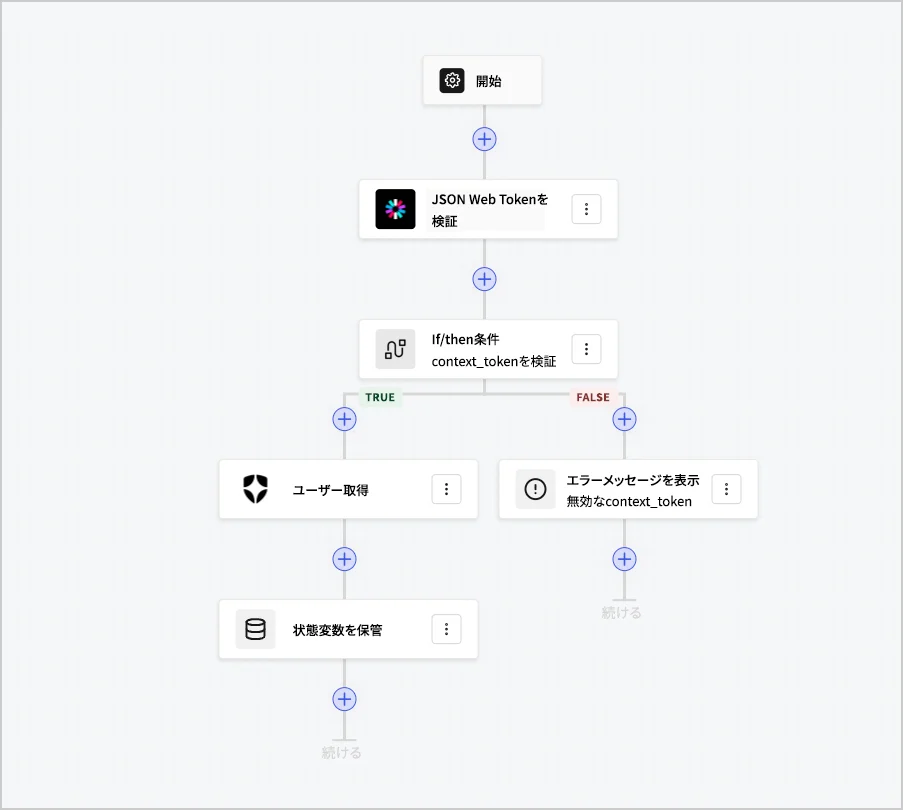
フローを使用すると、フォーム内で実行可能なサーバー側のロジックを視覚的に構築し、収集した情報の処理、APIによるサービスの統合、自動化のトリガーを行えます。
<Frame>
  <img src="https://mintcdn.com/docs-staging-chore-teams-api-autoupdate/Xm1OrJunJnzhqjge/docs/images/ja-jp/cdy7uua7fh8z/6u6Huh5CbH3GEQJv3AH7cx/2847deefe749de5e0f5c8957ff9aa92e/Flows.png?fit=max&auto=format&n=Xm1OrJunJnzhqjge&q=85&s=df38bc4fe3d22917d13fbbec8834580c" alt="Dashboard > Forms > Flows" data-og-width="903" width="903" data-og-height="810" height="810" data-path="docs/images/ja-jp/cdy7uua7fh8z/6u6Huh5CbH3GEQJv3AH7cx/2847deefe749de5e0f5c8957ff9aa92e/Flows.png" data-optimize="true" data-opv="3" srcset="https://mintcdn.com/docs-staging-chore-teams-api-autoupdate/Xm1OrJunJnzhqjge/docs/images/ja-jp/cdy7uua7fh8z/6u6Huh5CbH3GEQJv3AH7cx/2847deefe749de5e0f5c8957ff9aa92e/Flows.png?w=280&fit=max&auto=format&n=Xm1OrJunJnzhqjge&q=85&s=8f1c3f0cc9faf4ca1dcbdffcc945527a 280w, https://mintcdn.com/docs-staging-chore-teams-api-autoupdate/Xm1OrJunJnzhqjge/docs/images/ja-jp/cdy7uua7fh8z/6u6Huh5CbH3GEQJv3AH7cx/2847deefe749de5e0f5c8957ff9aa92e/Flows.png?w=560&fit=max&auto=format&n=Xm1OrJunJnzhqjge&q=85&s=e8504335af92cbb0dbb23abe9a1284dc 560w, https://mintcdn.com/docs-staging-chore-teams-api-autoupdate/Xm1OrJunJnzhqjge/docs/images/ja-jp/cdy7uua7fh8z/6u6Huh5CbH3GEQJv3AH7cx/2847deefe749de5e0f5c8957ff9aa92e/Flows.png?w=840&fit=max&auto=format&n=Xm1OrJunJnzhqjge&q=85&s=58d9a80e4767ae8c0462d8a8e70818d4 840w, https://mintcdn.com/docs-staging-chore-teams-api-autoupdate/Xm1OrJunJnzhqjge/docs/images/ja-jp/cdy7uua7fh8z/6u6Huh5CbH3GEQJv3AH7cx/2847deefe749de5e0f5c8957ff9aa92e/Flows.png?w=1100&fit=max&auto=format&n=Xm1OrJunJnzhqjge&q=85&s=497011b6cd097e70375c9edfb2bcfa9a 1100w, https://mintcdn.com/docs-staging-chore-teams-api-autoupdate/Xm1OrJunJnzhqjge/docs/images/ja-jp/cdy7uua7fh8z/6u6Huh5CbH3GEQJv3AH7cx/2847deefe749de5e0f5c8957ff9aa92e/Flows.png?w=1650&fit=max&auto=format&n=Xm1OrJunJnzhqjge&q=85&s=4fb79e4f162adb534bd585fe48119ed1 1650w, https://mintcdn.com/docs-staging-chore-teams-api-autoupdate/Xm1OrJunJnzhqjge/docs/images/ja-jp/cdy7uua7fh8z/6u6Huh5CbH3GEQJv3AH7cx/2847deefe749de5e0f5c8957ff9aa92e/Flows.png?w=2500&fit=max&auto=format&n=Xm1OrJunJnzhqjge&q=85&s=6cab4e9df47dbf9caa00ecf2a69a7745 2500w" />
</Frame>

フォームでフローアクションを使用して次のことが可能です。

* フォームの手順に関するカスタムのサーバー側検証を作成する。
* カスタムHTTP要求を作成して、独自のAPIと統合する。
* すぐに導入できる統合を使用して、サードパーティと統合する。
* ユーザーの入力またはプロパティに基づいて異なるビジネスロジックを実行する。
* JSON Webトークンを使用してデータを検証する。
